
TUI
Embeddings tab
The Embeddings tab manages the vector embedding backends that power semantic search. You can see which providers are configured, how many memories each has indexed, and trigger reindexing operations.
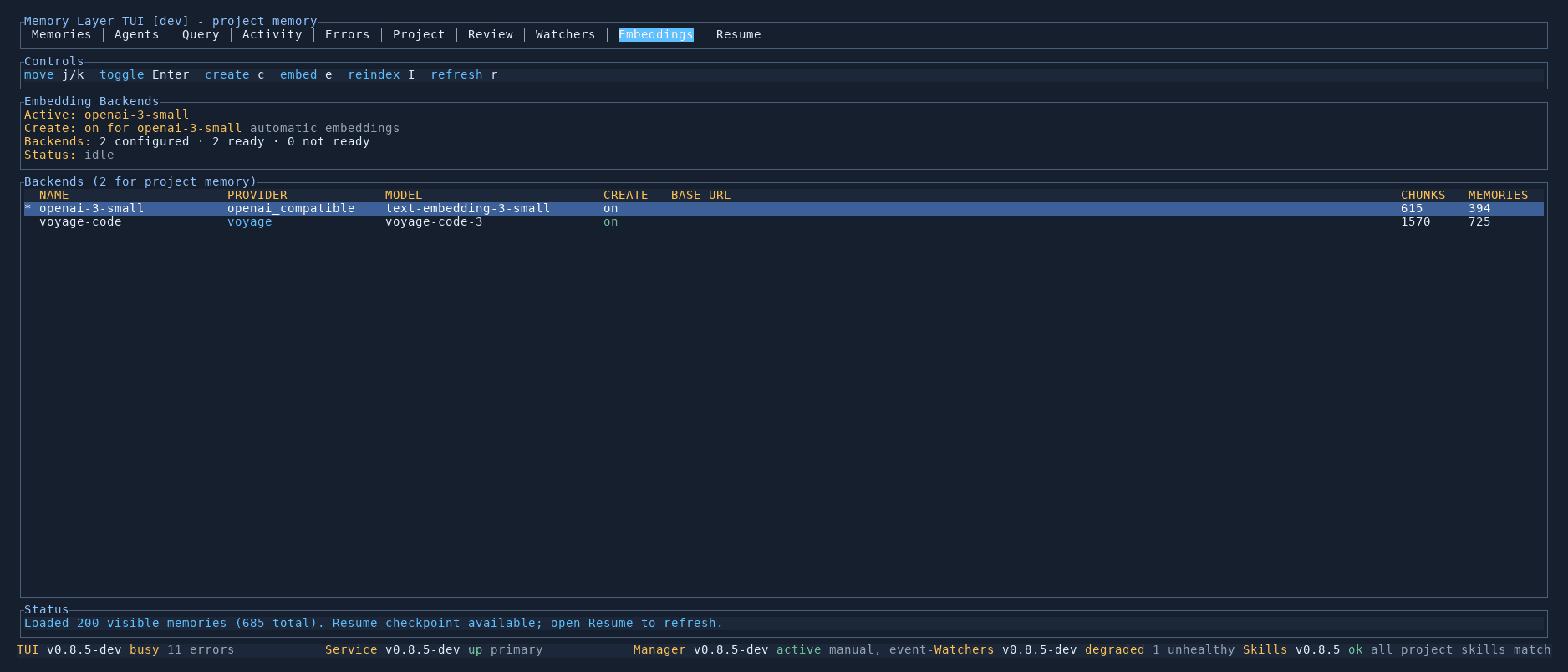
Summary
The top section shows:
- Active backend — which embedding provider is currently used for new memories
- Create status — whether automatic embedding is enabled for the active backend
- Backends — total count of configured, ready, and not-ready backends
- Status — whether the embedding system is idle or processing
Backends table
The main table lists all configured embedding backends with columns:
| Column | Description |
|---|---|
| Name | The backend identifier (e.g. openai-3-small, voyage-code) |
| Provider | The provider type (openai_compatible, voyage, ollama) |
| Model | The specific model used (e.g. text-embedding-3-small, voyage-code-3) |
| Create | Whether new memories are automatically embedded by this backend |
| Base URL | Custom endpoint URL, if configured |
| Chunks | How many embedding chunks this backend has produced |
| Memories | How many memories have been indexed |
The active backend is highlighted with an asterisk.
Operations
You can run multiple backends simultaneously — for example, one for fast search and another for higher quality. Each backend maintains its own chunk store independently.
Controls
| Key | Action |
|---|---|
j / k | Move between backends |
Enter | Toggle the selected backend |
c | Create a new backend |
e | Embed memories with the selected backend |
I | Reindex all search chunks |
r | Refresh the backends list |